halcon培训-快速傅里叶变换(FFT)对塑料制品-@龙熙视觉
halcon培训-快速傅里叶变换(FFT)对塑料制品-@龙熙视觉
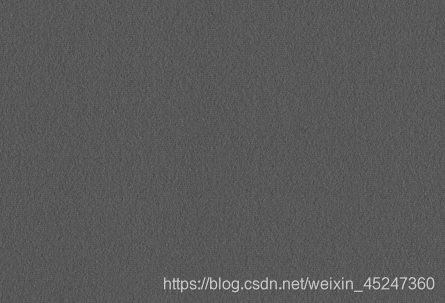
- This program demonstrates how to detect small texture
- defects on the surface of plastic items by using the fast
- fourier transform (FFT).
- First, we construct a suitable filter using Gaussian
- filters. Then, the images and the filter are convolved
- by using fast fourier transforms. Finally, the defects
- are detected in the filtered images by using
- morphology operators.
**例程:detect_indent_fft.hdev
-
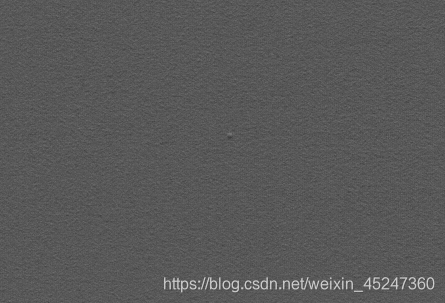
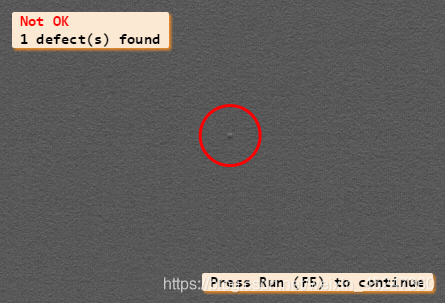
说明:这个程序展示了如何利用快速傅里叶变换(FFT)对塑料制品的表面进行目标(缺陷)的检测,大致分为三步:
-
首先,我们用高斯滤波器构造一个合适的滤波器(将原图通过高斯滤波器滤波);
-
然后,将原图和构造的滤波器进行快速傅里叶变换;
-
最后,利用形态学算子将缺陷表示在滤波后的图片上(在缺陷上画圈)。*
-
Initializations
-
在程序执行过程中选择将PC更新操作打开或关闭
dev_update_off ()
*** 关闭激活的图形显示窗口**
dev_close_window ()
read_image (Image, ‘plastics/plastics_01’)
get_image_size (Image, Width, Height)
dev_open_window (0, 0, Width, Height, ‘black’, WindowHandle)
set_display_font (WindowHandle, 14, ‘mono’, ‘true’, ‘false’)
-
显示的对象只有边缘线,
dev_set_draw (‘margin’) -
线宽用Line Width 指定
dev_set_line_width (3) -
指定颜色
dev_set_color (‘red’) -
Optimize the fft speed for the specific image size
-
对指定大小的图片的fft速度进行优化
optimize_rft_speed (Width, Height, ‘standard’) -
Construct a suitable filter by combining two gaussian
-
filters
-
构造两个高斯滤波器
-
定义两个常量
Sigma1 := 10.0
Sigma2 := 3.0
gen_gauss_filter (GaussFilter1, Sigma1, Sigma1, 0.0, ‘none’, ‘rft’, Width, Height)
gen_gauss_filter (GaussFilter2, Sigma2, Sigma2, 0.0, ‘none’, ‘rft’, Width, Height) -
两图片相减(灰度) 构造一个合适的滤波器
sub_image (GaussFilter1, GaussFilter2, Filter, 1, 0) -
gauss_image(Filter, ImageGauss, 5)
-
gauss_filter(Image, ImageGauss1, 10)
-
Process the images iteratively
NumImages := 11
for Index :=1 to NumImages by 1
Index :=2
*-
Read an image and convert it to gray values
read_image (Image, ‘plastics/plastics_’ + Index$‘02’) -
把一个RGB图像转变成一个灰度图像。
rgb1_to_gray (Image, Image) -
Perform the convolution in the frequency domain
*3-5-7-9-11
gauss_filter(Image, ImageGauss1, 9) -
在快速傅里叶变换中 计算一个图像的实值。
rft_generic (Image, ImageFFT, ‘to_freq’, ‘none’, ‘complex’, Width) -
用在频域内的滤波器使一个图像卷积。
-
不做滤波的话 ,无法去除噪声
convol_fft (ImageFFT, Filter, ImageConvol)
rft_generic (ImageFFT, ImageFiltered, ‘from_freq’, ‘n’, ‘real’, Width) -
Process the filtered image
-
用一个矩形掩码计算像素点的灰度范围
*是一个8位单通道图像(灰度图/二值图)
*掩码某个位置如果为0,则在此位置上的操作不起作用
*掩码某个位置如果不为0,则在此位置上的操作会起作用
*可以用来提取不规则ROI
gray_range_rect (ImageFiltered, ImageResult, 10, 10)
-
-
intensity(ImageResult, ImageResult, MeanValue, Deviation)- 决定区域内最小最大灰度值
min_max_gray (ImageResult, ImageResult, 0, Min, Max, Range)
- 决定区域内最小最大灰度值
if (Max > 6.8)
value := 6.8
else
value := Max * 0.8
endif
* 利用全局阈值对图像进行分割
threshold (ImageResult, RegionDynThresh, max([5.55,Max * 0.8]), 255)
-
计算区域内的连通部分
connection (RegionDynThresh, ConnectedRegions) -
根据指定的形态特征选择区域
select_shape (ConnectedRegions, SelectedRegions, ‘area’, ‘and’, 4, 99999) -
返回包含所有区域的集合
union1 (SelectedRegions, RegionUnion)
*闭运算
closing_circle (RegionUnion, RegionClosing, 10)

*连通域
connection (RegionClosing, ConnectedRegions1)

*特征筛选
select_shape (ConnectedRegions1, SelectedRegions1, 'area', 'and', 10, 99999)
* 计算区域的面积以及中心位置
area_center (SelectedRegions1, Area, Row, Column)
*
* Display the results
dev_display (Image)
 * 将区域面积个数赋给Number,用于后面显示生成缺陷个数
 Number := |Area|
if (Number)
    *画出1个或者多个缺陷位置,并且显示
    gen_circle_contour_xld (ContCircle, Row, Column, gen_tuple_const(Number,30), gen_tuple_const(Number,0), gen_tuple_const(Number,rad(360)), 'positive', 1)
    ResultMessage := ['Not OK',Number + ' defect(s) found']
    Color := ['red','black']
    dev_display (ContCircle)
else
    ResultMessage := 'OK'
    Color := 'forest green'
endif
disp_message (WindowHandle, ResultMessage, 'window', 12, 12, Color, 'true')
if (Index != NumImages)
    disp_continue_message (WindowHandle, 'black', 'true')
    stop ()
endif
endfor