vue汉字转拼音-pinyin.js
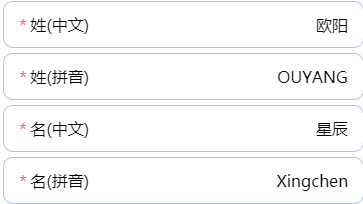
需求:用户在输入姓和名字的时候,由于姓(拼音)和名(拼音)为字母,容易输错,于是就有了自动生成拼音这个需求
npm install安装的四种用法-save和-save-dev
npm install xxx: 安装项目到项目目录下,不会将模块依赖写入devDependencies或dependencies。
npm install -g xxx: -g的意思是将模块安装到全局,不是安装到当前目录的项目下
npm install -save xxx: -save的意思是将模块安装到项目目录下,并在package文件的dependencies节点写入依赖。
npm install -save-dev xxx:
-save-dev的意思是将模块安装到项目目录下,并在package文件的devDependencies节点写入依赖。
一:安装
npm install js-pinyin --save
二:使用<script></script>标签引入
     let pinyin = require('js-pinyin');
     pinyin.setOptions({checkPolyphone: false, charCase: 0});
三:使用示例
<template>
<div class="demo">
<input v-model="surname" type="text" placeholder="姓(中文)">
<input v-model="surnamePinyin.toUpperCase()" type="text" placeholder="姓(拼音)">
<input v-model="givenName" type="text" placeholder="名(中文)">
<input v-model="givenNamePinyin" type="text" placeholder="名(拼音)">
</div>
</template>
<script>
let pinyin = require('js-pinyin');
pinyin.setOptions({checkPolyphone: false, charCase: 0});
console.log(pinyin.getFullChars('徐').toUpperCase());
console.log(pinyin.getFullChars('管理员'));
console.log(pinyin.getCamelChars('管理员'));
console.log(pinyin.getCamelChars('1234'));
console.log(pinyin.getCamelChars('english'));
export default {
name: "School",
data() {
return{
surname:'',
givenName:''
}
},
computed:{
surnamePinyin(){
return pinyin.getFullChars(this.surname)
},
givenNamePinyin(){
return pinyin.getFullChars(this.givenName)
}
}
}
</script>
三:属性详解
 // setOptions中传入对象,对象可传两个参数
 // charCase参数: 输出拼音的大小写模式,0-首字母大写;1-全小写;2-全大写
 // checkPolyphone:是否检查多音字
 pinyin.setOptions({checkPolyphone: false, charCase: 0});


 // getCamelChars: 获取拼音首字母
 // getFullChars: 获取拼音
 console.log(pinyin.getFullChars('徐'));Xu
 console.log(pinyin.getCamelChars('徐'));X
输出结果,因为要求姓的拼音是大写,可以通过
pinyin.setOptions 设置charCase为1 或者直接toUpperCase()即可
