TextView内容过多,超过n行显示“...全文”
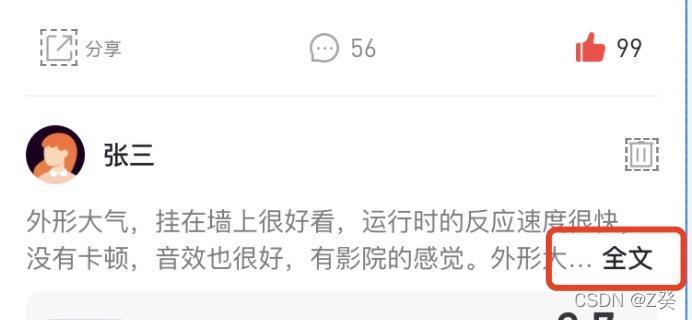
一、需求图片
内容超过两行时,在末尾显示“… 全文”
二、上代码
	/**
     * TextView超过两行,末尾显示"...全文"
     * 为避免抖动,需在xml中设置TextView的maxHeight
     * @param maxLine 最多几行
     * @param strNum  末尾显示字符数
     * @param str  末尾显示字符
     */
    open fun setOnGlobalLayout(
        it: TextView,
        maxLine: Int = 2,
        strNum: Int = 3,
        str: String = "...<font color='#212126'> 全文</font>"
    ) {
        val observer = it.viewTreeObserver
        observer.addOnGlobalLayoutListener(object : ViewTreeObserver.OnGlobalLayoutListener {
            override fun onGlobalLayout() {
                if (it.width > 0 && it.height > 0) {
                    it.visibility = View.VISIBLE
                    if (observer.isAlive) {
                        //判断ViewTreeObserver 是否alive,如果存活的话移除这个观察者
                        it.viewTreeObserver.removeOnGlobalLayoutListener(this)
                    }
                    if (it.lineCount > maxLine) {
                        val html1: String =
                            it.text.toString().subSequence(0, it.layout.getLineEnd(maxLine - 1) - strNum).toString()
                        it.text = fromHtml(html1 + str)
                    }
                }
            }
        })
    }


    private fun fromHtml(source: String?): Spanned? {
        return if (Build.VERSION.SDK_INT >= Build.VERSION_CODES.N) {
            Html.fromHtml(source, Html.FROM_HTML_MODE_LEGACY)
        } else {
            Html.fromHtml(source)
        }
    }
注意 :为避免抖动,需在xml中设置TextView的maxHeight
<TextView
    android:id="@+id/tv_content"
    android:layout_width="0dp"
    android:layout_height="wrap_content"
    android:maxHeight="@dimen/dp_40"
    .../>
三、其他需求
点击 “全文”,在列表中展开全文,后续补上。。。
写在最后
此文章为个人开发时记录,有时时间有限,无法深入研究,若看到此文章后有其他见解或解决方式,欢迎留言交流👇👇👇
————————————————
版权声明:转载请附上原文出处链接及本声明。
原文链接
https://editor.csdn.net/md/?articleId=123739650